A login screen is not proof that a site is genuine. Follow a verification sequence before entering any username, password, PIN or one-time code.
A safer login sequence
1
Start from a saved, previously verified address
A message, ad or search result can point to a lookalike. Compare the complete hostname, not just a logo or page colour.
2
Inspect the connection and page behaviour
HTTPS protects transport; it does not prove the operator is legitimate. Leave if the page asks for remote-access software, screen sharing or an OTP by chat.
3
Use a unique password
Do not reuse an email, banking or social password. A password manager can generate and store a different credential for each service.
4
Stop when the destination changes unexpectedly
Unexpected redirects, new payment recipients or a suddenly different support number require fresh verification.
Old link, new device or failed password?
SituationSafer next step
Saved link no longer opensDo not choose a replacement solely from an ad. Verify through a support channel you previously established.
Password is rejectedUse the service’s own reset path. Never send a password or OTP to an agent.
Account appears lockedPause repeated attempts, preserve screenshots and ask what identity checks are required before sending documents.
Payment request appears during loginStop. Login recovery and payment should not be conflated without a clear explanation.
What this site will never ask for
Your Allpanel Exchange username or password
An SMS, authenticator or payment OTP
Your UPI PIN, card PIN or full banking credential
A remote-control app or screen-sharing session
Important: Similar names in search results do not establish common ownership. Treat every new hostname as a new destination that needs verification.
When you cannot establish a trusted route
Do not improvise. Save any transaction references you already have, avoid sending additional money and consult the payment safety guide. If the issue may involve fraud, contact your bank or payment provider using the number in its official app or website.
Detailed login route and account recovery safety guide
A complete decision framework for Allpanel Exchange login route, password and recovery checks
Direct answer: Verify the exact login destination before typing anything. A padlock, copied logo or familiar page layout cannot establish ownership, and a legitimate recovery process should never require you to disclose an OTP, password, recovery code or banking secret to a guide or chat agent.
For this page, the useful question is practical: what can you verify before the decision becomes costly or difficult to reverse? The page focus here is Allpanel Exchange login route, password and recovery checks. Keep the conclusion narrower than the evidence. A familiar name, attractive interface or successful page load is not enough to prove operator identity, legal status, payment performance or account safety.
Work in sequence and write down the result of each check. A short record reduces the chance that urgency, memory or a persuasive chat message will replace the facts you actually observed. Allpanel Exchange Guide does not receive passwords, OTPs, payment credentials or identity documents, and it cannot verify private account outcomes.
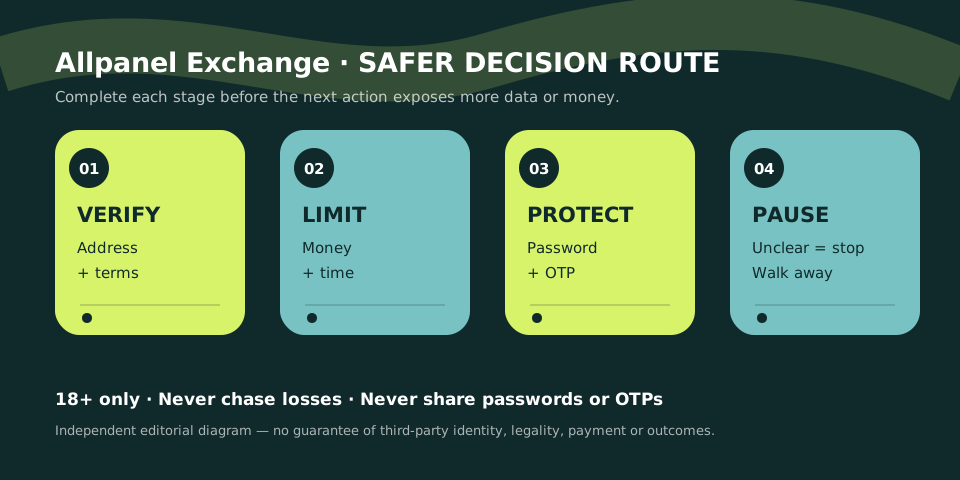
A four-stage review for Allpanel Exchange login route, password and recovery checks: verify the claim, set the boundary, protect sensitive data and pause when evidence is incomplete.
Terminology before action
Six terms that make this page easier to use
Definitions matter because a familiar word can create false confidence. Read the term together with the rule, screen or evidence that gives it meaning. If a third-party page uses different language, do not assume the outcome or obligation is unchanged.
01
Hostname
The core web address shown in the browser, which should be read carefully before credentials are entered. In the context of Allpanel Exchange login route, password and recovery checks, use this term only as precisely as the applicable page or rule allows; similar labels can conceal different conditions.
02
HTTPS
Connection encryption between the browser and site; it does not prove the site’s identity or honesty. In the context of Allpanel Exchange login route, password and recovery checks, use this term only as precisely as the applicable page or rule allows; similar labels can conceal different conditions.
03
Password manager match
A useful signal when saved credentials appear only on the exact domain where they were created. In the context of Allpanel Exchange login route, password and recovery checks, use this term only as precisely as the applicable page or rule allows; similar labels can conceal different conditions.
04
OTP
A one-time code that can authorise access or payment and should be treated as a secret. In the context of Allpanel Exchange login route, password and recovery checks, use this term only as precisely as the applicable page or rule allows; similar labels can conceal different conditions.
05
Recovery route
A previously verified process for resetting access without relying on new contacts found under pressure. In the context of Allpanel Exchange login route, password and recovery checks, use this term only as precisely as the applicable page or rule allows; similar labels can conceal different conditions.
06
Session
The authenticated browser state that should be ended on shared devices and reviewed after suspicious activity. In the context of Allpanel Exchange login route, password and recovery checks, use this term only as precisely as the applicable page or rule allows; similar labels can conceal different conditions.
A repeatable process
Step-by-step checklist
Follow these steps in order. Earlier checks are deliberately low commitment; later steps can expose identity, device access or money. Stop as soon as a material requirement is unclear or conflicts with your legal, financial or personal boundary.
Open a known route
Use a saved address or independently verified source instead of a link in an unexpected message. Complete this check before moving to a step that exposes more personal information or money. Record what you verified, where you found it and what remains uncertain.
Read the entire hostname
Check spelling, subdomain order and the part immediately before the domain extension. Complete this check before moving to a step that exposes more personal information or money. Record what you verified, where you found it and what remains uncertain.
Let the password manager signal
An absent automatic match can be a reason to recheck the destination rather than manually pasting. Complete this check before moving to a step that exposes more personal information or money. Record what you verified, where you found it and what remains uncertain.
Use a unique password
Do not reuse the credential protecting email, banking or another important account. Complete this check before moving to a step that exposes more personal information or money. Record what you verified, where you found it and what remains uncertain.
Keep codes private
Enter an OTP only into the verified flow that you personally initiated. Complete this check before moving to a step that exposes more personal information or money. Record what you verified, where you found it and what remains uncertain.
Recover without urgency
Use the published recovery route and resist demands for deposits, screen sharing or remote control. Complete this check before moving to a step that exposes more personal information or money. Record what you verified, where you found it and what remains uncertain.
Review the session
Sign out on shared devices and secure connected accounts after any suspected exposure. Complete this check before moving to a step that exposes more personal information or money. Record what you verified, where you found it and what remains uncertain.
Compare the signal with the response
Decision table for Allpanel Exchange login route, password and recovery checks
Use the table to convert observations into actions. It avoids two common extremes: treating a small positive sign as total approval, or continuing to send information and money merely to resolve uncertainty.
What you observe
What it means
Safer next step
Saved password matches the exact host
One continuity signal is present. This is a decision signal, not a complete safety verdict.
Still check the page and context. Keep the response within your pre-set money, time and privacy boundaries.
A character in the hostname differs
The destination may be unrelated. This is a decision signal, not a complete safety verdict.
Close it without logging in. Keep the response within your pre-set money, time and privacy boundaries.
Support asks for an OTP
A secret is being requested. This is a decision signal, not a complete safety verdict.
Refuse and end the contact. Keep the response within your pre-set money, time and privacy boundaries.
Recovery requires a deposit
Payment pressure is present. This is a decision signal, not a complete safety verdict.
Do not send money. Keep the response within your pre-set money, time and privacy boundaries.
Credentials were reused elsewhere
Multiple accounts are exposed. This is a decision signal, not a complete safety verdict.
Change email and critical passwords first. Keep the response within your pre-set money, time and privacy boundaries.
Risks worth spotting early
Common mistakes and why they matter
Most preventable harm begins with a shortcut: assuming the name proves identity, letting urgency replace verification, or redefining an affordable limit after a loss. These patterns are more important than small cosmetic differences between pages.
01
Searching during an outage
Urgency can push users toward copied support numbers and newly registered login pages. The practical correction is to pause, return to the relevant evidence and avoid making the next action larger simply because time has already been spent.
02
Trusting the padlock alone
Scam and impersonation sites can also obtain valid HTTPS certificates. The practical correction is to pause, return to the relevant evidence and avoid making the next action larger simply because time has already been spent.
03
Pasting from a message
A convincing message can conceal a different destination behind familiar link text. The practical correction is to pause, return to the relevant evidence and avoid making the next action larger simply because time has already been spent.
04
Sharing the screen
Remote viewers may see OTPs, saved passwords, bank notifications and recovery information. The practical correction is to pause, return to the relevant evidence and avoid making the next action larger simply because time has already been spent.
05
Repeating failed attempts
Multiple submissions can expose credentials and trigger lockouts without resolving the real route. The practical correction is to pause, return to the relevant evidence and avoid making the next action larger simply because time has already been spent.
Put the checklist into practice
Three realistic scenarios
Scenarios reveal how several risks combine. The details will vary, but a sound response usually slows the decision, separates the communication route from the verification route and keeps financial exposure from growing.
The bookmark redirects
Situation: A previously saved login route suddenly forwards to a different hostname.
Safer response: Do not assume the change is authorised. Close the page, preserve the old and new addresses and seek confirmation through a separate verified channel before entering credentials.
Notice the pattern: the response protects credentials, preserves a record and keeps the reader free to walk away. It does not promise that a disputed account, transaction or third-party service can be recovered.
The password manager stays silent
Situation: The page looks familiar but the saved login does not appear.
Safer response: Treat that absence as a useful warning. Read the hostname character by character and compare it with the domain stored in the password manager.
Notice the pattern: the response protects credentials, preserves a record and keeps the reader free to walk away. It does not promise that a disputed account, transaction or third-party service can be recovered.
An agent offers instant recovery
Situation: A chat contact asks for an OTP or remote screen access to fix the account.
Safer response: End the contact. Secure email and payment accounts if anything was shared, then use only the service’s independently verified recovery route.
Notice the pattern: the response protects credentials, preserves a record and keeps the reader free to walk away. It does not promise that a disputed account, transaction or third-party service can be recovered.
Evidence boundary
What this guide can and cannot establish
This Allpanel Exchange page can explain login route and account recovery safety for Allpanel Exchange login route, password and recovery checks, organise questions and show how to preserve useful records. It does not establish that a third-party domain is official, that an operator is licensed for a reader’s location, that a payment will be returned, or that any game outcome can be predicted.
Current details should be checked at the moment they matter. Terms, domains, app files, support routes and legal context can change. Prefer official primary material for changing public rules and use qualified professional advice when the consequences are material.
Keep sensitive information outside the research process. Redact passwords, OTPs, card security codes, recovery codes and unrelated identity data from any record you retain. If you suspect fraud or unauthorised access, use the official channel of your bank, payment provider, email service or relevant authority—not a number supplied by an unknown intermediary.
Clear answers
Frequently asked questions about Allpanel Exchange login route, password and recovery checks
Can I log in on this guide?
No. This independent site does not operate accounts or accept credentials. When a material fact is missing, keep the conclusion cautious and use the relevant internal guide to complete the next check.
Does HTTPS prove a login page is genuine?
No. It encrypts traffic but does not prove the operator’s identity. When a material fact is missing, keep the conclusion cautious and use the relevant internal guide to complete the next check.
Should support know my password?
No. Support should never need your password, OTP or recovery code. When a material fact is missing, keep the conclusion cautious and use the relevant internal guide to complete the next check.
What if the usual address changes?
Stop and verify the new hostname through a separate trusted route before using it. When a material fact is missing, keep the conclusion cautious and use the relevant internal guide to complete the next check.
What should I secure after a suspected phish?
Change reused passwords starting with email, review financial activity and terminate unfamiliar sessions. When a material fact is missing, keep the conclusion cautious and use the relevant internal guide to complete the next check.
Related next steps
Continue with the guide that matches your task
Open one focused page, complete its checklist and keep your decision reversible. If uncertainty remains, stop rather than moving to a more sensitive or expensive action.
Hello! 👋 Do you want to Create your IPL Cricket Betting ID ?
Kisi bhi top bookie (Reddy Anna, Lotus, etc.) se apni Betting ID lo, fatak se 60 seconds mein. Tension-free khelo kyunki humara 24/7 live chat support hamesha aapke saath hai.